

Exam – the electronic examination system
Karelia University of Applied Sciences uses EXAM – the electronic examination system. The aim of the electronic examination system is to increase flexibility in taking course exams, enhance the quality of studies as well as advance graduation. Taking exams in the electronic exam room may decrease anxiety related to exams.
What is EXAM?
EXAM is an electronic examination system in which exams are taken electronically. There are ten computers in the room, which do not have access to the internet. Use of USB-sticks and proofreading is blocked. The EXAM room is supervised by real time and recording video surveillance as well as random checks. EXAM enables the students to take course exams and maturity exams electronically. Teachers define which exams can be taken electronically. In addition, the teachers define the time constraints of their exams. An exam that will require books, the internet or drafting paper cannot be taken in EXAM.
How to register?
During his/her first registration, the student must accept The Karelia EXAM Terms of Use. The registration for the exam prepared by the teacher takes place at https://exam.karelia.fi/ . Do not use IE browser.
You can also register by using your mobile phone:
The EXAM room (Tenttitupa): The EXAM room (Tenttitupa) is open from Monday to Friday at 8.00 – 18.00.
The EXAM room is located in E226.
The main entrance door of Tikkarinne campus, E-building, is open:
from Monday to Thursday at 7.30 – 16.30 and on Friday at 7.30 – 15.30.
ATTENTION! The EXAM system is closed from 15. to 16.6.2026. During this time, you will not be able to log in to EXAM. The outage is due to technical issues with the EXAM administrator. EXAM will be available normally on Wednesday 17.6.2026.
Summer 2026: EXAM opening hours
EXAM is open normally until Thu 18.6.2026.
In week 26 (Mon 22.6. – Fri 26.6.) EXAM is open from 8.00 to 16.00. The main door of Tikkarinne campus closes at 15.00. If your exam starts at 15.00, please arrive on campus on time.
If you want to take the exam in July, this is possible as an exam visit. In that case, always check the opening hours of the target university on the Exam Visits page. EXAM Tenttitupa opens normally on Thu 6.8.2026.
After registration, the student chooses the suitable time for the exam. A confirmation message is sent to the student’s e‐mail with the information about the exam time and computer reserved for the student. The exams start always on the hour and the student can enter the room five (5) minutes before and 10 minutes past the starting time. The room is available during the opening hours of the campus Mon-Fri 8-18.
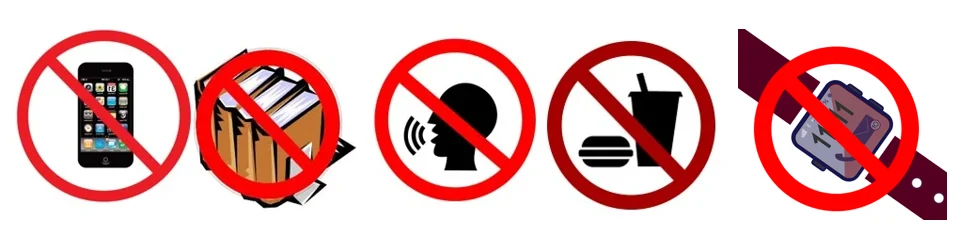
It is forbidden to bring phone, smart watch, papers of other belongings to the EXAM room. This also applies to snacks and water bottles. Jackets and other belongings can be left in the lockers outside the exam room. It is allowed to take the locker key to the exam room. Work silently in the exam room! There is no speaking allowed in the room. Exiting the exam room during the exam is not allowed. Take your personal photo ID card with you and place it the photo side of the card facing up on the designated area on the table!
Hygiene in the EXAM room
There are hand sanitizers available in the room. There are cleaners available in the EXAM room for wiping the keyboard, the mouse and the desktop. It is forbidden to enter campus premises if you are sick! If you become sick, cancel your exam in the EXAM-system
Students´ EXAM process
Registration for electronic exams consists of registration phase and time‐booking‐phase. Both phases are completed in the information system “Exam”. Registration can be done from any computer with internet connection with Firefox as the recommended browser. You can have one registration per exam in force at one time.
Act accordingly:
- Open a browser – Remember to empty the cache before and after using Exam if you are using a public computer.
- Log in at the Karelia-UAS ‘s Exam – Use your Karelia-UAS account username and password.
The user name has to be entered in the short format (e.g. 88993342) - Find the exam you want to register for.
Copy‐paste the link if you’ve received from the teacher to the address row of the browser.
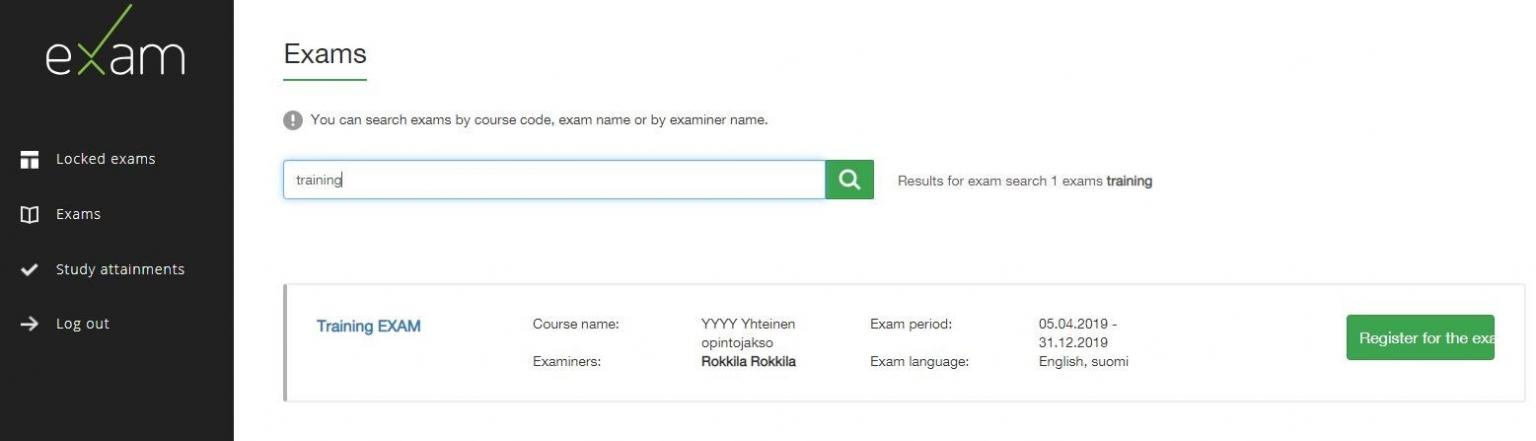
Otherwise find exam from Exams-part by find box. You can search exams by course code, exam name or by examiner name. - Register for the exam by clicking the “Register for the exam” ‐button.
System confirms your registration by announcing ”You have registered to an exam. Remember to book an exam time.” - Choose from “Exam room” drop‐down list either Computers or Easy‐access computers, if you need a workstation with an electrically adjustable desk.
- Book a vacant exam time.
Choose a suitable time from all the available time slots in the booking calender.
A confirmation message is sent to your e‐mail with the information about the exam time and computer reserved for you. - If you are unable to attend the exam cancel or modify your reservation by choosing either ”Reschedule exam” or “Remove the booking” in the booking calendar of the respective exam.
You can cancel or modify your reservation until the time of your reservation. Please act on time so that the exam slot can be used by others.
Note! So far you can only cancel the time reservation. The registration cannot be removed. A registration without booked time does not count as an attempt for examination.
STUDENT, take a training exam!
You can register to a rehearsal exam and take it during a time you choose.
Students’ instructions
- When the time reserved for the exam begins, arrive at the exam room.
- Check the number of exam computer from the email you received.
The exam will only open on the computer indicated in the message. - Open the computer and log in at the Karelia-UAS ‘s Exam (icon is on the desktop of computer) – Use your Karelia-UAS account username and password.
- You can answer to the questions in any order.
Return from the question view to the main view with the Exam overview button. - On the top of the view, there is an egg clock that shows you the time left.
In the middle of the view there is the list of questions and their answering situations. - The system autosaves you answer with few minutes intervals.
Also moving between questions autosaves the answer.
Note that if you delete your answer, the system may autosave the empty answer! - When you are ready, return to the overview.
Be sure to attach any attachments before you finish the exam. - Click there on the Submit! -button.
Remember to log out.
You can leave the computer running.
After that leave the exam room.
Report problems exam(at)karelia.fi
Problems concerning your Karelia-UAS account report it-helpdesk(at)karelia.fi
EXAM visits
EXAM visit means that you take your own university’s exam in another university’s EXAM room. Before booking a time for your exam in another university, please check the rules and regulations of that university as well as the opening hours and how to access the EXAM room. Make also sure that the programs you need for the exam are available in the EXAM room.
Exam visit means that you take your own university’s exam in another university’s Exam room. Before booking a time for your exam in another university, please check that university’s rules and regulations as well as opening hours and how to access the exam room.
Please check! At the moment EXAM visit is possible in the following institutions.
To book an exam time
- Log in to your own university’s EXAM with your user id and password.
- Click Exams in the navigation on the left and type the course code in the search field. You can also search for an exam by exam name or teacher’s name.
- The system gives you a list of exams based on your search, choose the right exam by clicking the green box “Registering for the exam”.
NB! If you are registering for a personal exam or maturity test, the exam is ready on your dashboard when you log in to EXAM. - To book a time in another university, click “Exam room reservation from external institution”
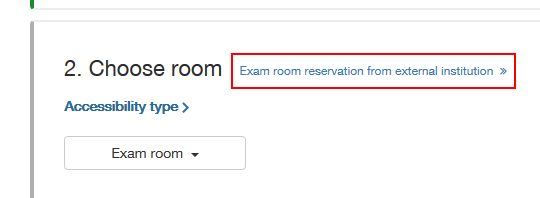
- Choose the organization from the drop down menu and after that the exam room.
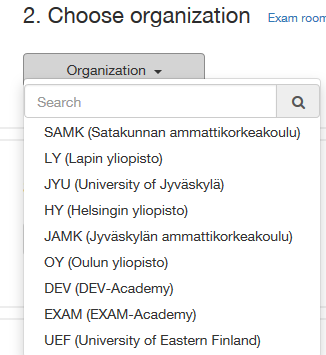
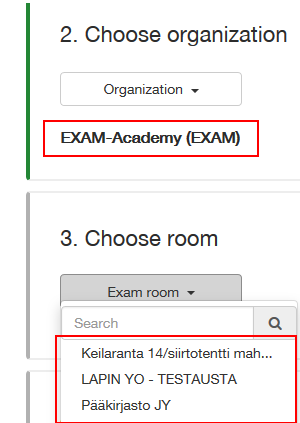
- Now you see the booking calendar, choose a time and confirm your booking.
- Make sure you check the other university’s info and instructions for exam visit before you book the time.
- When you go to take your exam, you log in to the other university’s EXAM with your own university’s user id and passwo
EXAM visit means that you take an exam for a course of your own university in an EXAM exam room of another university. The exam visit is booked in your own university’s EXAM system using your university’s login credentials.
The exam room has real-time and recorded camera surveillance. When you book an exam time in organization Karelia Univeristy of Applied Scienses exam room, you accept organization Karelia UAS’s rules for electronic exams and surveillance practices. During an exam visit, camera surveillance recordings are handed over to your home university if necessary.
Possible exam times and exceptions can be seen in the booking calendar.
Please read the instructions below. For questions about exam visits, contact your own university’s EXAM support.
It is forbidden to enter campus premises if you are sick!
If you become sick, cancel your exam in the EXAM-system.
Please consider the following issues when visiting Karelia UAS EXAM room:
Rules of Karelia UAS EXAM room
It is forbidden to bring phone, smart watch, papers of other belongings to the EXAM room. This also applies to snacks and water bottles. Jackets and other belongings can be left in the lockers outside the exam room. It is allowed to take the locker key to the exam room. Work silently in the exam room! There is no speaking allowed in the room. Exiting the exam room during the exam is not allowed.
Take your personal photo ID card with you and place it the photo side of the card facing up on the designated area on the table!
Karelia UAS EXAM room (E226) is located on Tikkarinne campus, Tikkarinne 9, building E. The EXAM room is located on the first floor (street level) next to the library.
The EXAM room is open for exam visits from Monday to Friday at 8-18.
The campus main doors are open from Monday to Thursday at 7.30-16.30 and on Friday at 7.30 – 15.30. Please make sure you arrive on campus in plenty of time before the front door closes.
NOTE! You can find unusual opening hours on the homepage of the EXAM guide.
You do not need an access key to enter the EXAM room. The electric lock on the EXAM room door opens five minutes before each exam time (e.g. at 8.55 when your exam starts at 9.00 or at 13.55 when your exam starts at 14.00) and is open for 15 minutes. Make sure you access the EXAM room on time since you cannot enter the EXAM room after the door has been locked.
You don’t need usernames to unlock the computer. Use your own university’s username and password when logging into the EXAM system. Select your own university from the HAKA list when logging into EXAM.
Available software and other resources
There is no internet access in Karelia UAS Exam room; you can only access the EXAM system and use the following programs during the exam: Acrobat Reader, Calculator, Excel (2021), IrfanView, Notepad++, PowerPoint (2021), VLC, Word (2021). If you need any other programs in the exam, you cannot take the exam at Karelia UAS EXAM room.
If you have any problems with the exam, please contact the EXAM support of your own university or your examiner.
If you have any problems related to logging into the computer in the EXAM room, please contact Karelia UAS Helpdesk: [email protected] or Karelia UAS EXAM support [email protected]. There is an information desk in the campus lobby where you can ask to contact support.