
Instructions for visiting Karelia UAS EXAM room
EXAM visit means that you take an exam for a course of your own university in an EXAM exam room of another university. The exam visit is booked in your own university’s EXAM system using your university’s login credentials.
The exam room has real-time and recorded camera surveillance. When you book an exam time in organization Karelia Univeristy of Applied Scienses exam room, you accept organization Karelia UAS’s rules for electronic exams and surveillance practices. During an exam visit, camera surveillance recordings are handed over to your home university if necessary.
Possible exam times and exceptions can be seen in the booking calendar.
Please read the instructions below. For questions about exam visits, contact your own university’s EXAM support.
It is forbidden to enter campus premises if you are sick!
If you become sick, cancel your exam in the EXAM-system.
Please consider the following issues when visiting Karelia UAS EXAM room:
Rules of Karelia UAS EXAM room
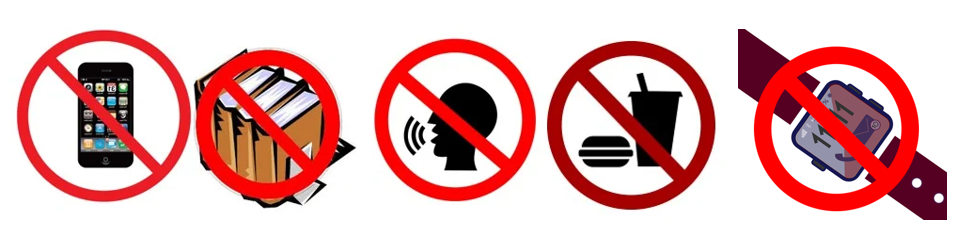
It is forbidden to bring phone, smart watch, papers of other belongings to the EXAM room. This also applies to snacks and water bottles. Jackets and other belongings can be left in the lockers outside the exam room. It is allowed to take the locker key to the exam room. Work silently in the exam room! There is no speaking allowed in the room. Exiting the exam room during the exam is not allowed.
Take your personal photo ID card with you and place it the photo side of the card facing up on the designated area on the table!
Karelia UAS EXAM room (E226) is located on Tikkarinne campus, Tikkarinne 9, building E. The EXAM room is located on the first floor (street level) next to the library.
The EXAM room is open for exam visits from Monday to Friday at 8-18.
The campus main doors are open from Monday to Thursday at 7.30-16.30 and on Friday at 7.30 – 15.30. Please make sure you arrive on campus in plenty of time before the front door closes.
NOTE! You can find unusual opening hours on the homepage of the EXAM guide.
You do not need an access key to enter the EXAM room. The electric lock on the EXAM room door opens five minutes before each exam time (e.g. at 8.55 when your exam starts at 9.00 or at 13.55 when your exam starts at 14.00) and is open for 15 minutes. Make sure you access the EXAM room on time since you cannot enter the EXAM room after the door has been locked.
You don’t need usernames to unlock the computer. Use your own university’s username and password when logging into the EXAM system. Select your own university from the HAKA list when logging into EXAM.
Available software and other resources
There is no internet access in Karelia UAS Exam room; you can only access the EXAM system and use the following programs during the exam: Acrobat Reader, Calculator, Excel (2021), IrfanView, Notepad++, PowerPoint (2021), VLC, Word (2021). If you need any other programs in the exam, you cannot take the exam at Karelia UAS EXAM room.
If you have any problems with the exam, please contact the EXAM support of your own university or your examiner.
If you have any problems related to logging into the computer in the EXAM room, please contact Karelia UAS Helpdesk: [email protected] or Karelia UAS EXAM support [email protected]. There is an information desk in the campus lobby where you can ask to contact support.
More information: EXAM Guide